Feature · Worker & Crew App

Built for the field. Not the office.

Three languages. Real-time bonuses. Goal-setting on the go. Workers see exactly what they're earning, why, and what's coming next. The phone is where adoption happens.
Daily dashboard Update progress Rewards tracking
App available in English Español Português More languages coming.

The worker journey

Open the app. Update the work. Earn the bonus.

Three taps a day. Crews see what they're earning in real time, on the same screen they use to check the weather. No clipboard, no spreadsheet, no questions about pay.

1

See your day

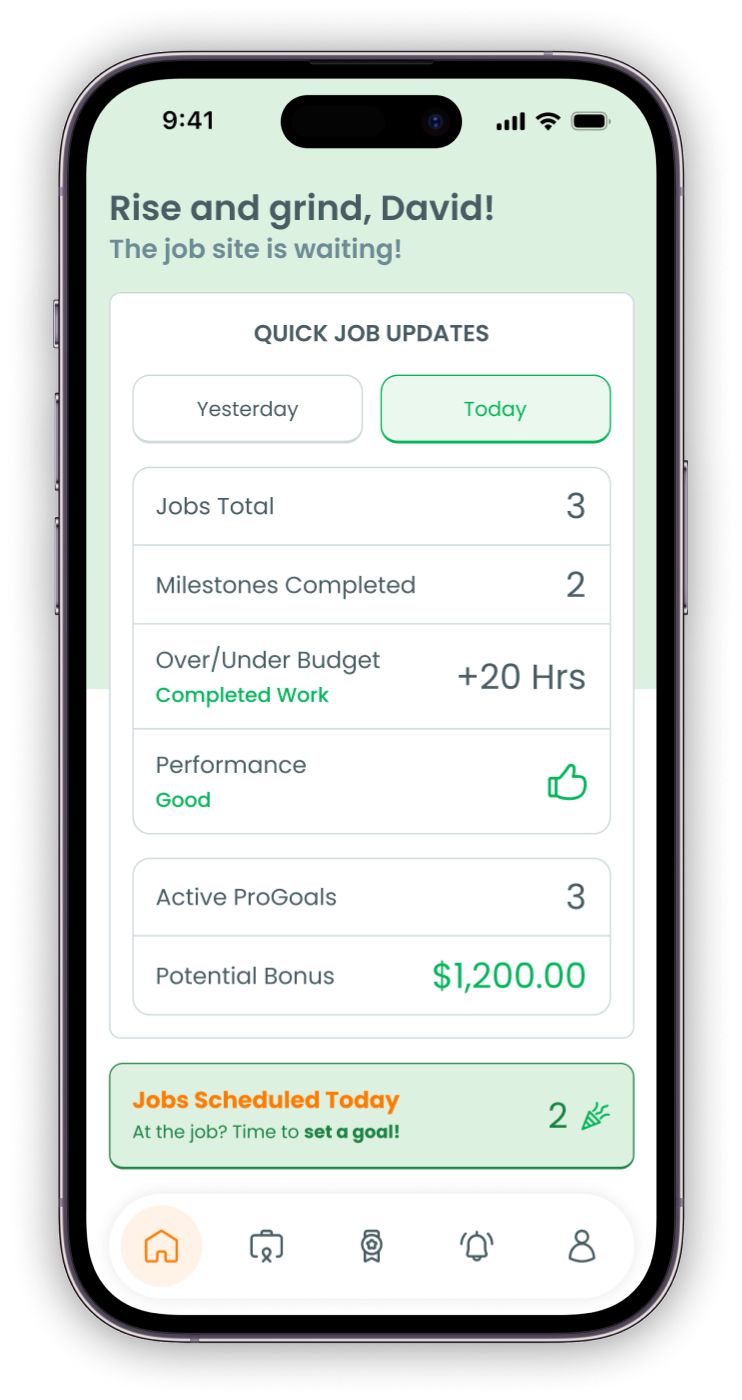
Today's jobs, milestones, performance, and what bonus is on the table — all on the home screen.

2

Update the work

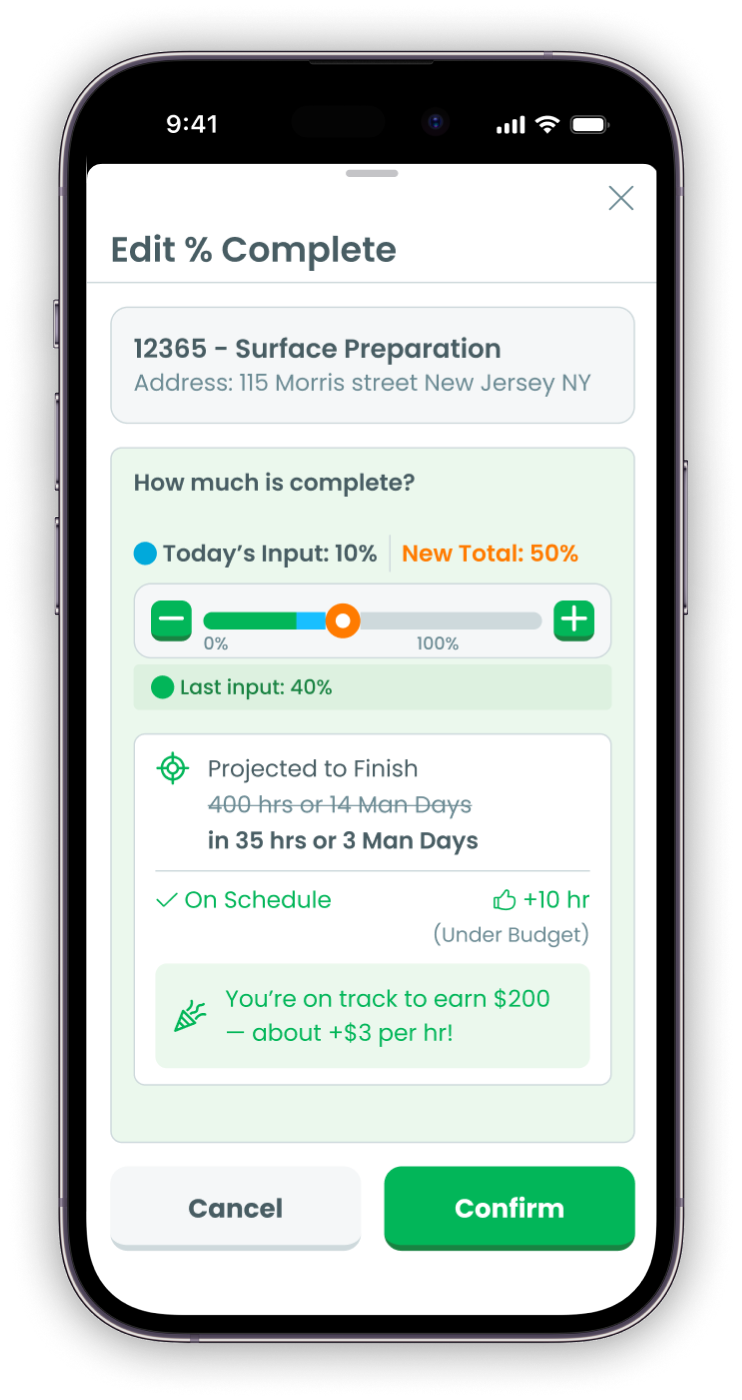
Slide percent complete. Watch the bonus projection update in real time. The whole crew sees what's coming.

3

Earn the bonus

Statements, paid bonuses, items on hold. Every dollar earned shows up in the rewards view, every payday.

Five core moments

Built around how crews actually work.

Every screen serves a single moment in a worker's day — plus a profile that holds the whole story together. Open it on the way to the job. Update it during the job. Check it on payday. Track your trajectory over time. The math is on the phone, not in someone else's spreadsheet.

Moment 1 — Morning

See today's job in one view

Open the app, see the day — jobs, milestones, performance, active goals, and the bonus on the table.

Workers walk in knowing what's at stake. No briefing. No clipboard. Just the screen and the work.

  • Today vs Yesterday tab — see the whole picture at a glance
  • Performance rating + thumbs-up icon for fast scanning
  • Potential bonus visible the moment the day starts
  • "Time to set a goal" prompt for new jobs
Daily dashboard with job updates and potential bonus
Moment 2 — On the job

Update progress. Watch the bonus build live.

Slide percent complete. The projection recalculates — *ahead 10 hours, under budget* — and the bonus updates with it: *on track for $200, about +$3 per hour.*

Workers see what their work is worth the moment they do it. Three taps. The crew watches the number move with them.

  • Slider-based percent complete update
  • Projection card recalculates with every update
  • Real-time bonus estimate, in real dollars
  • Submit triggers crew-wide visibility
Edit percent complete with real-time bonus projection
Moment 3 — Setting goals

Set the goal. Share with the team.

Crew leads set the goal from the phone before the job starts. Pick the target, see the bonus, hit *Share with Team* — every crew member gets the same numbers.

This is what flips adoption. Workers don't get bonuses imposed on them — they help set the goal and own the outcome.
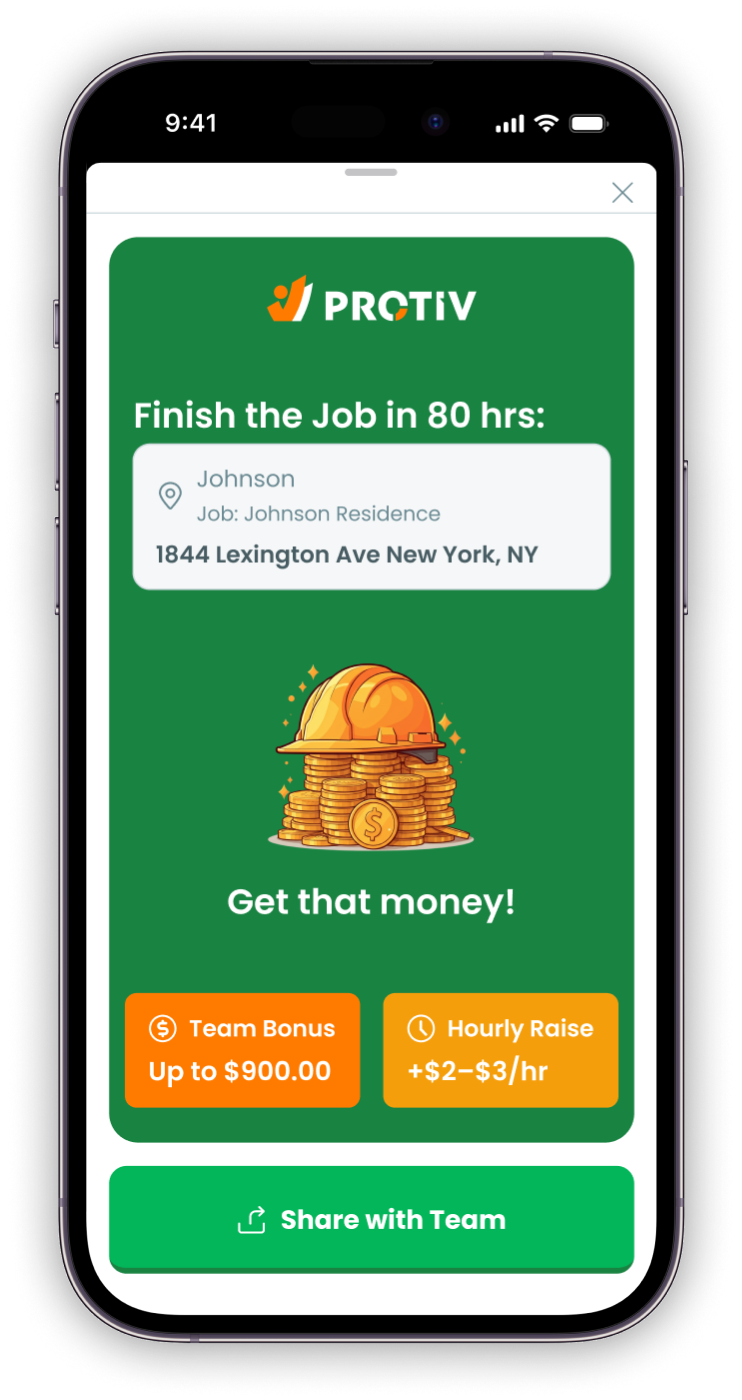
  • Calculator preview before the job starts
  • Visual share card with hourly raise + total bonus
  • Sent to every crew member's phone
  • Same numbers visible to everyone, all the time
Share the goal with the team — total bonus up to $900, hourly raise +$2 to $3
Moment 4 — Payday

Track every dollar earned

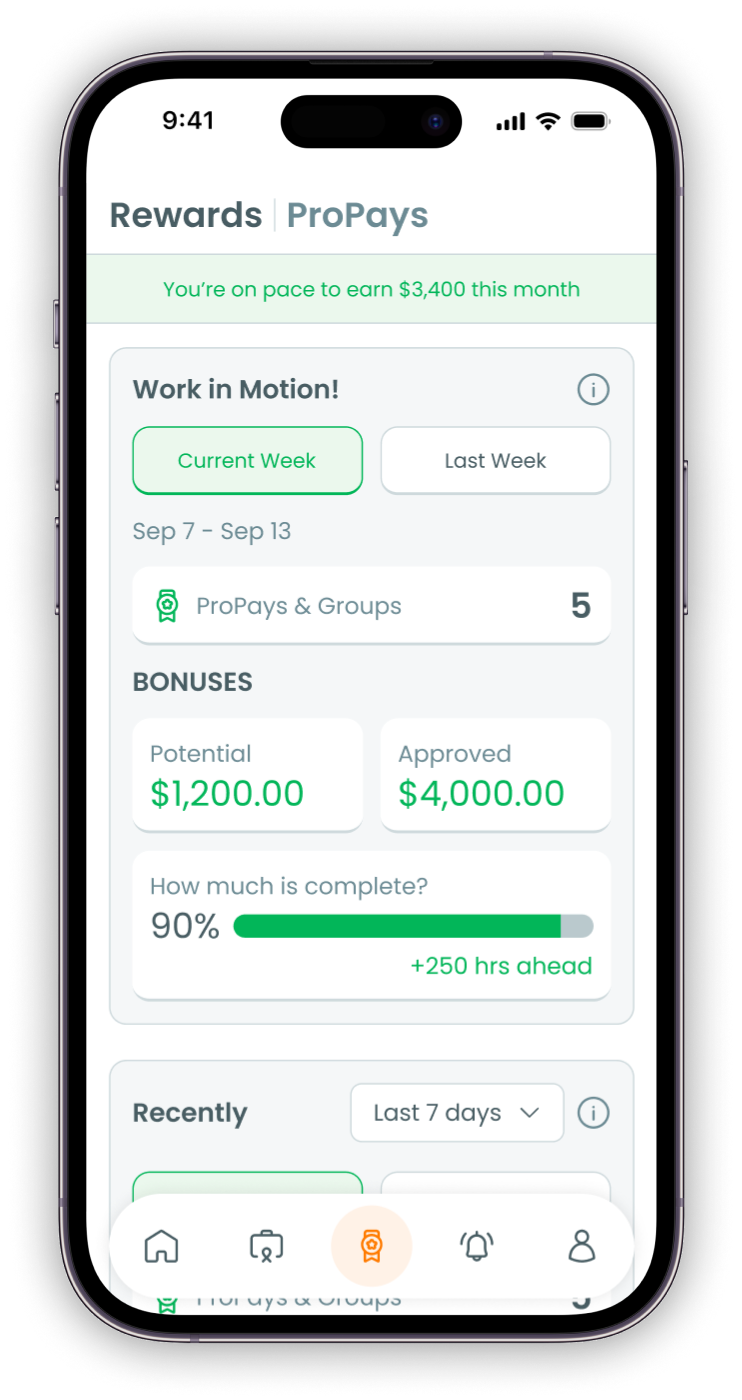
The rewards view shows what's earned this month, this week, and per job — potential, approved, on hold. Everything labeled. No payday surprises.

Workers stop wondering about pay. Same numbers payroll sees. Trust replaces argument.

  • Potential vs Approved bonus split, weekly and monthly
  • Statements, paid bonuses, items on hold — all in one place
  • Per-job breakdown showing where every dollar came from
  • Statement view payroll uses too — same numbers for everyone
Rewards and ProPays view — on track for $3,400 this month, $1,200 potential, $4,000 approved
Moment 5 — The profile

Their stats. Their statements. Their story.

Every worker has a profile with the whole picture — personal stats, bonus statements, wage growth over time.

That's what turns a one-off bonus into ownership. Workers watch their numbers move and argue about ranks at break time — for the right reasons.
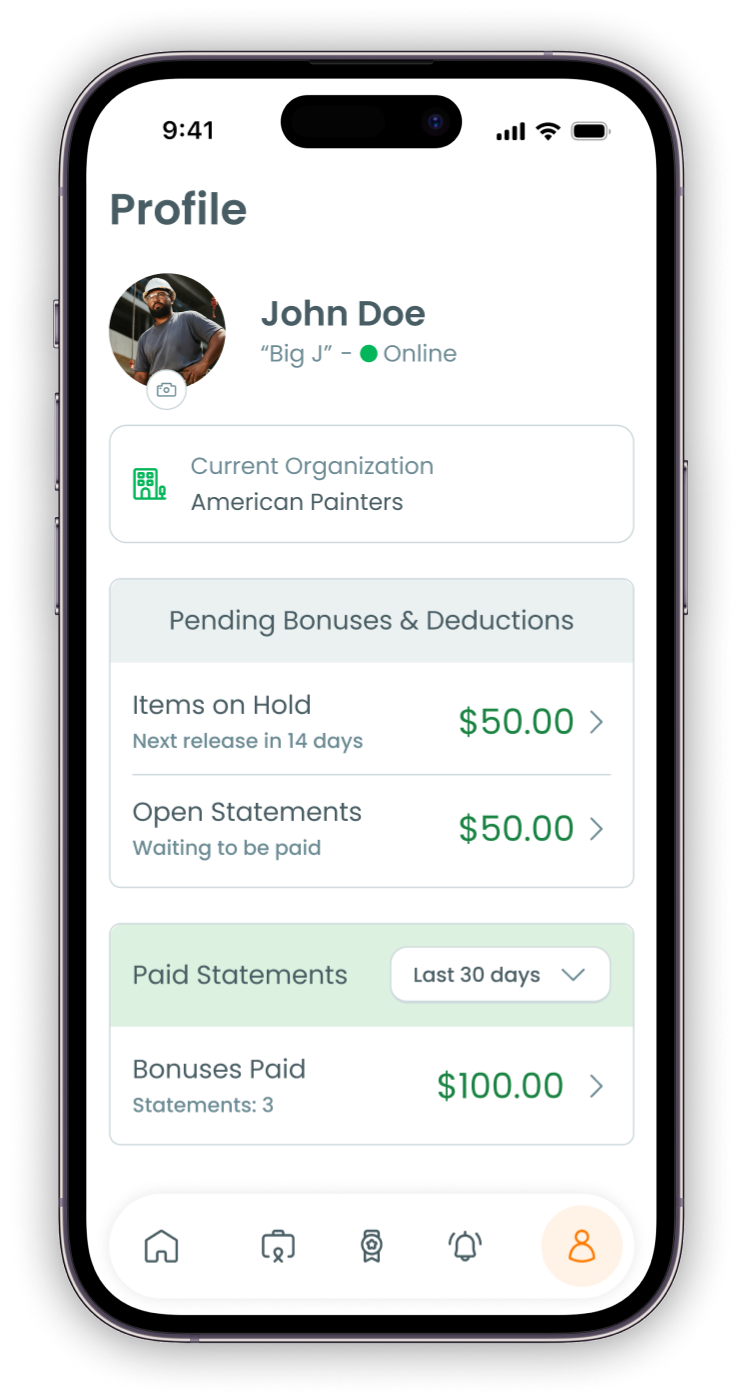
  • 15 personal stats — from bonus earned to wage growth
  • Every bonus statement, viewable in the app
  • PDF export from the web for sharing
  • Crew + branch rank — healthy peer comparison
Worker profile — personal stats, bonus statements, wage growth over time

Personal stats

15 ways every worker can track their own performance.

Workers don't just see bonuses. They see how they're performing on the job, how they compare to their crew, and how their own pay has grown over time. Built into the profile, available every day.

Bonus earned

Bonus wage

Wage growth

Jobs under budget

Hours under budget

Top bonus jobs

Top percentile

Bonus breakdown

Total days worked

On-job days

On-job hours

Produced hours

Jobs completed

Number of services

Number of visits

Adoption questions

Will my crew actually use it?

Worker adoption is the #1 fear. Here's how Protiv earns it.

My crew speaks Spanish, not English.
The app runs in English, Español, and Português. Each worker picks their own language in settings — same data, same experience.
What about workers who aren't tech-comfortable?
Three taps a day, three big buttons. The app is built for the job site, not the office. Workers who barely text can use it.
Does the app work without service?
Yes. Updates queue locally and sync when service comes back. No data lost. No friction at the rural job site.
How do crews see what others are earning?
They don't see individual paychecks. They see the crew-level pool, ranked stats, and their own personal performance. Healthy competition, no privacy issue.
Can crews game the system by inflating progress?
No. Final percent complete is reviewed at approval. Disqualifiers and quality checks gate payout. Inflated estimates get caught before bonuses pay.
What about workers who want a paper statement?
PDF statements are generated for every period, downloadable from the app or shared by the office. The mobile view is the default — paper backup is always available.

What this means for your business

Workers who can see their pay don't argue about pay.

3
Languages, day one
English, Español, Português — every worker, their language
+10%
Increase in worker wages
Real money in workers' pockets, earned on the work they did
15
Personal stat views
Workers track their own performance, not just bonuses

"Our crews are hitting incredible production levels. The app is part of the reason — they see it, they understand it, they own it."

— Mick Mulhall, Owner · Mulhall's Landscaping · 100+ employees

See the app on your team's phones.

30 minutes with our team. We'll demo the worker app live, in any language, on real data — and walk through what adoption looks like in the first 30 days.