Feature · Production Tracking

Tired of crews clocking in and out of work tickets and cost codes all day? Yeah, it sucks.

We've got a better way. Workers clock in once. Protiv auto-distributes their time across jobs, tracks % complete live, and turns every shift into clean production data — the kind that powers every bonus, every goal, and every call your foremen make in the field.
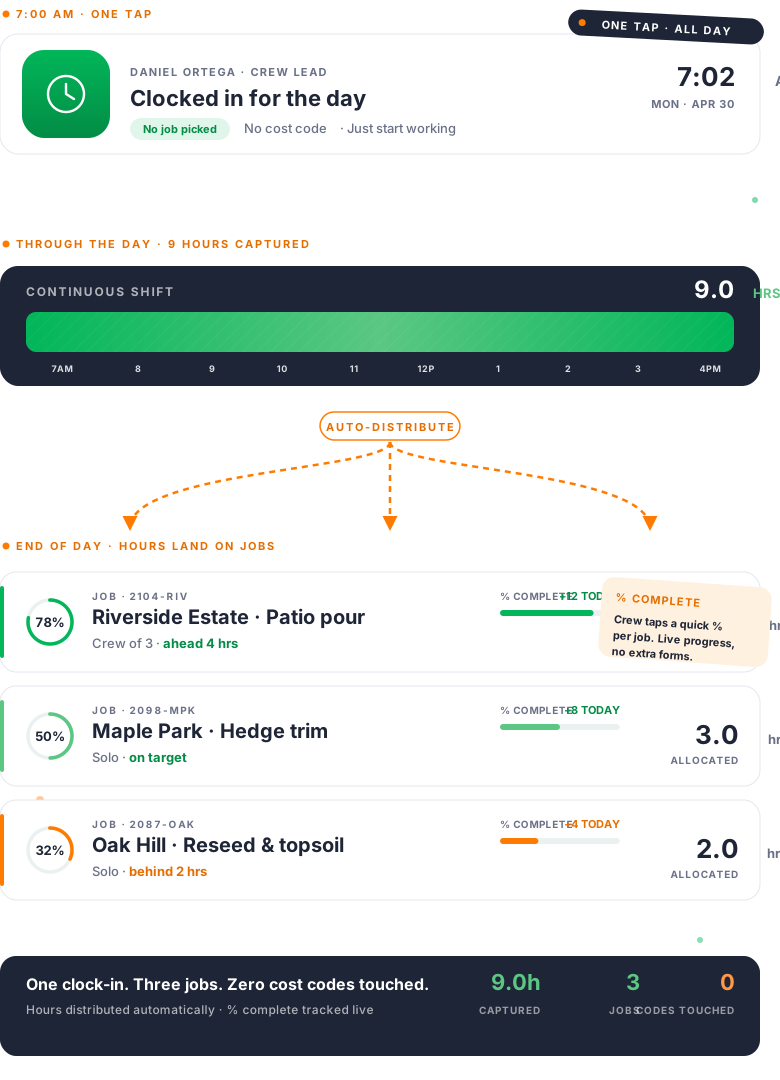
Time distribution engine — 9 hours captured, 3 jobs allocated, zero cost codes touched

How clean data happens

Time in. Production captured. Bonuses calculated clean.

Most field-service software makes workers clock in and out of every job, every cost code, every milestone — all day long. The data is wrong because the workflow is wrong. Protiv flips it.

1

Clock in once

Workers clock in at the start of the day, clock out at the end. No code-switching during the day.

2

Production tracked

Crew leads update percent complete on each job through the day. Three taps, real-time projection.

3

Time distributes itself

End of day, the system allocates the captured time across jobs based on actual production data. Clean inputs to every bonus calculation.

Three core capabilities

Built around the data, not the timesheet.

The point of Production Tracking isn't more clicking. It's less. Workers do less. Managers see more. The numbers feeding every bonus, every report, every payroll export are accurate — because they came from how the work actually happened.

Capability 1 — The differentiator

The Time Distribution Engine

Other tools make workers clock in and out of a cost code for every task — twelve switches a day. The data ends up wrong because the workflow is impossible.

Protiv captures clocked time once. Hours auto-distribute at end of day, based on actual production. Workers never interrupt their work.

  • Workers clock in once a day, clock out once a day
  • End-of-day distribution based on actual production data
  • Per-job hour allocation runs automatically
  • Distributed time pushes back to QB Time, Procore, Aspire, and Salesforce — payroll and job costing stay in sync
Time distribution engine showing 9 hours allocated across 3 jobs
Capability 2

Percent complete, with live projection

Crew leads slide percent complete. The projection updates live — *ahead 10 hours, under budget* — and the bonus moves with it: *on track for $200, +$3 per hour.*

Workers aren't reporting hours into a black box. They see the bonus build live. Adoption follows.
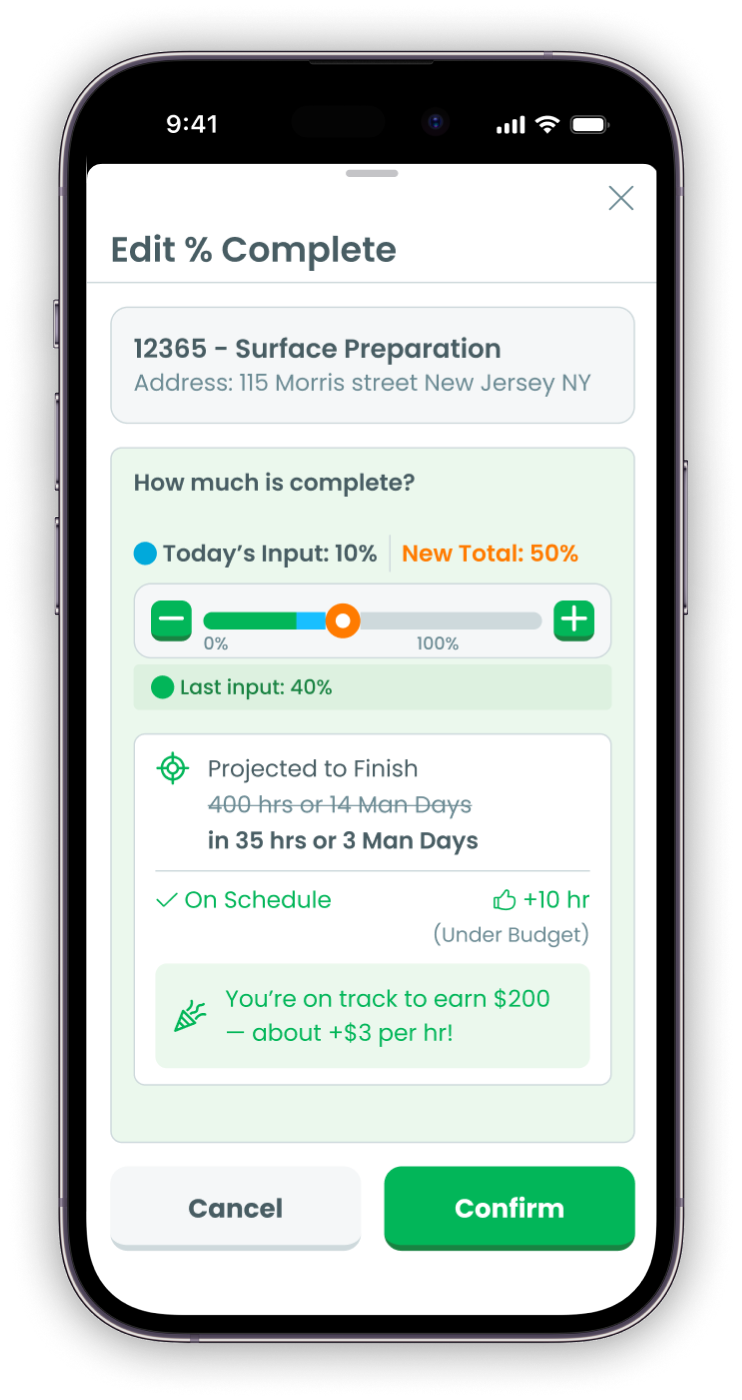
  • Slider-based update on the mobile app — three taps
  • Completion projection recalculates with every input
  • Real-time bonus estimate visible to the whole crew
  • Strikethrough math: "400 hrs / 14 man-days" → "35 hrs / 3 man-days" as the work progresses
Phone showing Edit % Complete with bonus projection
Capability 3

Real-time progress, every active job

Every active job in one dashboard — status, hour variance, bonus projection. Clean jobs stay quiet. Flagged jobs surface to the top.

No Friday-afternoon surprises. Problems get caught Tuesday, while there's still time to fix them.
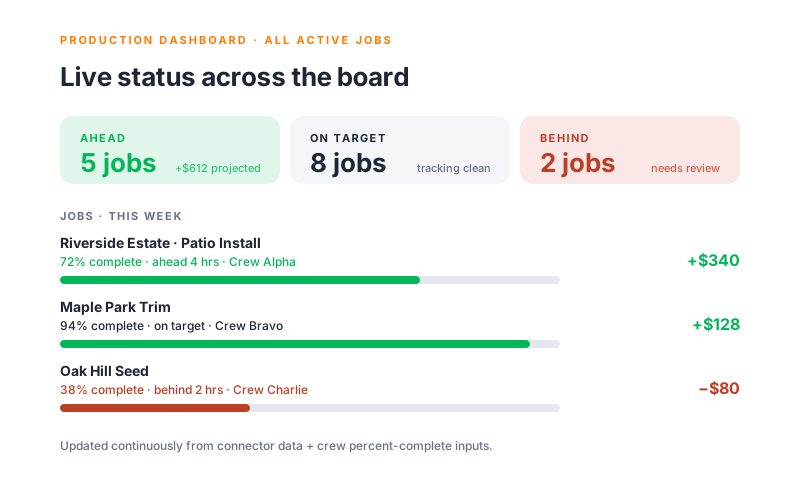
  • Live status across every active ProPay, group, and phased job
  • Color-coded ahead / on-target / behind indicators
  • Quick triage view — only flagged jobs need human attention
  • Drill into any job for full hour-by-hour history
Production dashboard showing 5 ahead, 8 on target, 2 behind
Capability 4 — Data integrity

Reads from where you already work. Writes back one thing.

Protiv doesn't replace your ops system. It reads jobs, time, milestones, contracts, and revenue from Aspire, QB Time, Procore, Salesforce, and the rest.

One outbound write: distributed time hours back to QB Time, Procore, Aspire, and Salesforce. Everything else flows in only.
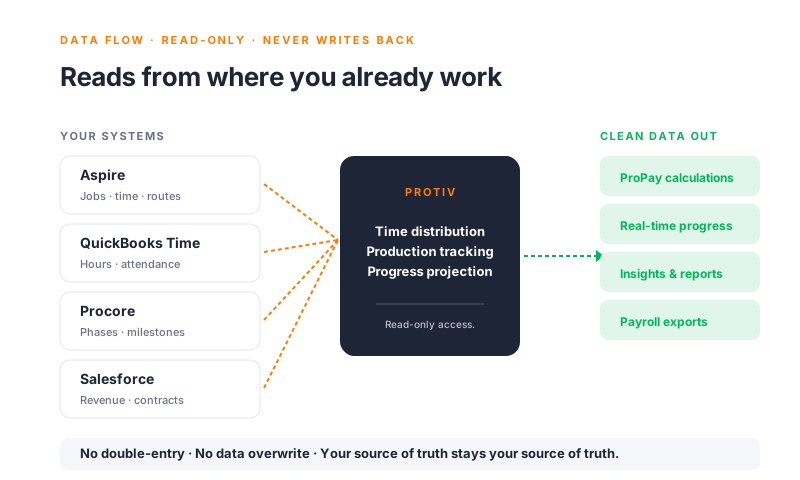
  • Read-mostly connector — pulls jobs, time, and structure
  • Single outbound write: distributed time hours back to four connectors
  • Aspire bonus push-back to job costing — coming soon
  • Disconnect anytime, no lock-in
Data flow from source systems through Protiv to clean outputs

Common questions

Real edge cases. Real answers.

Production tracking sounds simple — until it meets a real job site. Here's how Protiv handles it.

What if a worker forgets to clock out?
Auto-clock-out at a configured time, with a notification to the worker and manager. Or manual review at end of day. Your shop's choice.
Can workers split a day between two crews?
Yes. Time distributes based on production updates from each job. A worker who spent 5 hours on Job A and 3 hours on Job B gets credited correctly.
Does this replace my existing time tracking?
No. We read from QuickBooks Time, Aspire, or whatever you're already using. The time-distribution engine is layered on top — it doesn't replace.
What if our data is messy?
Most customers' data is messier than they think. We clean it on import and surface anomalies in the dashboard. Bad data shows up as flags before it ever hits a bonus calculation.
What about lunch breaks and unpaid time?
Configurable per branch. Auto-deduct lunch, manual lunch entry, or none — whatever your payroll already does, we mirror.
Does the time engine work with all connectors?
Time distribution pushes back to QB Time, Procore, Aspire, and Salesforce today. Other connectors get the dashboard and percent-complete tracking — write-back support rolls out as we expand.

15 minutes a week. Real data. Zero spreadsheets.

Production data flows continuously. Managers spend their week on the work, not chasing timesheets. The dashboard surfaces what needs attention. Payroll runs on numbers that match how the week actually happened.

See the dashboard →

What this means for your business

The data layer everything else stands on.

9 hrs
Captured per worker, per day
Distributed across jobs automatically — no cost-code switching
+21%
Increase in worker output
Live progress visibility drives pace across the crew
0
Data overwrite risk
Read-only connectors. Your source of truth stays your source of truth.

"Our crews aren't fighting the timesheet anymore. They're working — and the data is cleaner than it's ever been."

— Mick Mulhall, Owner · Mulhall's Landscaping

See production tracking on your data.

30 minutes with our team. We'll connect your existing system, show how time distributes across your real jobs, and walk through what production tracking would look like with your actual crews and rules.