
Feature · Insights & Leaderboards

The numbers your crew can see. The numbers you can run on.

A leaderboard in every worker's hand. A bonus-and-margin chart on every manager's wall. A multi-branch ROI rollup on the owner's screen. The same data, three views — and every one of them ties back to dollars.
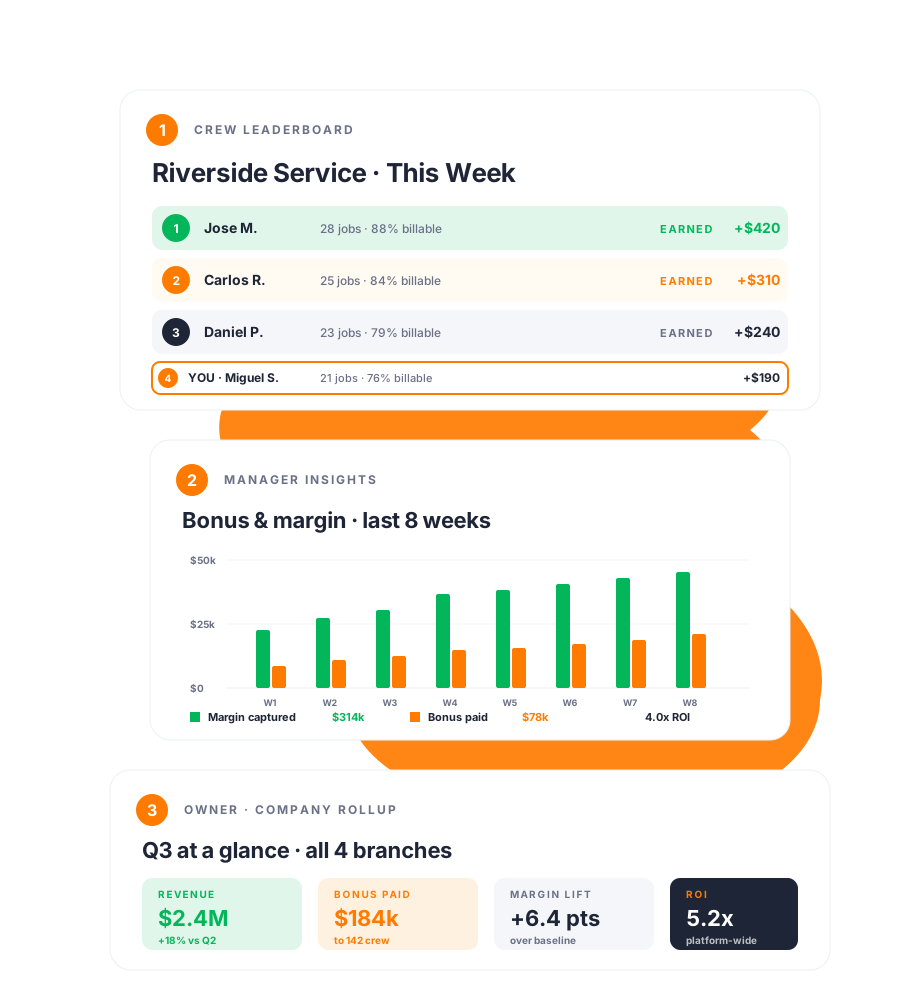
Crew leaderboard, manager 8-week trend, owner Q3 rollup

One data layer. Three audiences.

Visibility that fits the role.

Workers don't need a P&L. Owners don't need a stopwatch. Insights & Leaderboards delivers each level of the org the view that drives behavior at that level — from the same source of truth.

1

Crew sees the ladder

Live ranking inside the worker app — earnings, jobs closed, billable %. Pay drives effort. Effort drives the rank.

2

Managers see the trend

Branch dashboard with margin and bonus moving in lockstep. Spot the jobs slipping before payroll runs.

3

Owners see the ROI

Multi-branch rollup with a single ROI number per branch and one across the company. The board-level view.

Four capabilities

A view for every seat in the company.

No data warehouse to stand up. No BI license to budget for. The dashboards ship the day you turn Protiv on.

Capability 1 — On the floor

Live leaderboards in the crew's hand

Every worker opens the app and sees where they stand — rank, earnings, gap to next, dollars in closing it.

This is what turns the bonus pool into behavior. Invisible metrics get ignored. A live scoreboard pulls people up the ladder.
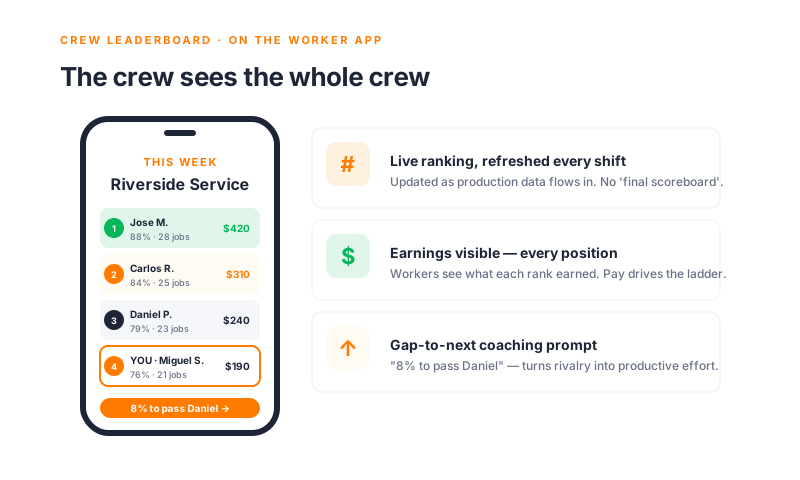
  • Branch-level ranking — refreshed every shift
  • Earnings visible at every position, not just the top
  • Gap-to-next coaching prompt — "8% to pass Daniel"
  • Privacy-aware: configurable visibility for sensitive comp
Crew leaderboard inside the worker app
Capability 2 — In the office

Manager dashboards that show pay paying off

Live view for branch managers: margin captured, bonus paid, jobs closed, ratio between them. The chart answers "is this working?" — week over week.

Catch drift before it lands in payroll. A flagged job Tuesday is a $2k save by Friday.
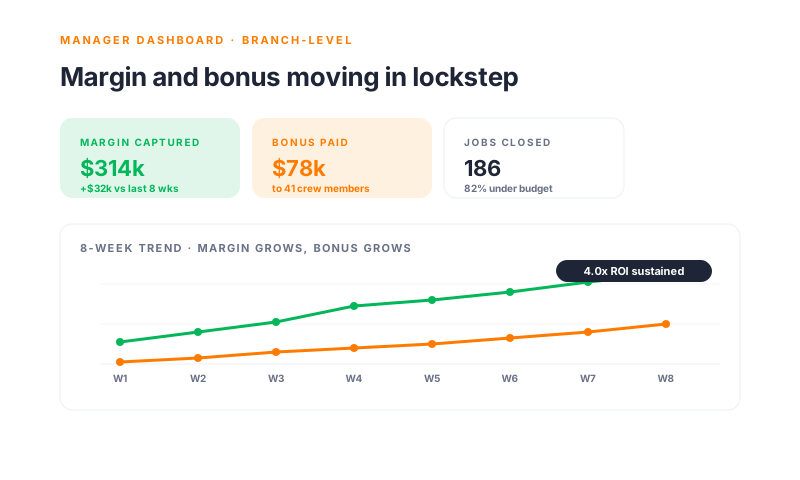
  • KPI tiles for margin captured, bonus paid, jobs closed
  • 8-week trend with bonus-vs-margin ratio overlaid
  • Drilldown by crew, route, division, or job
  • Automatic ROI calculation built in to every view
Manager dashboard with KPI tiles and trend chart
Capability 3 — In the boardroom

Owner-level rollup across every branch

One screen, every branch, ranked by ROI. Revenue, bonus paid, margin lift, multiplier — side by side.

This is the view that proves the program at board level. The number is a column, measured on actual paid bonus — not modeled potential.
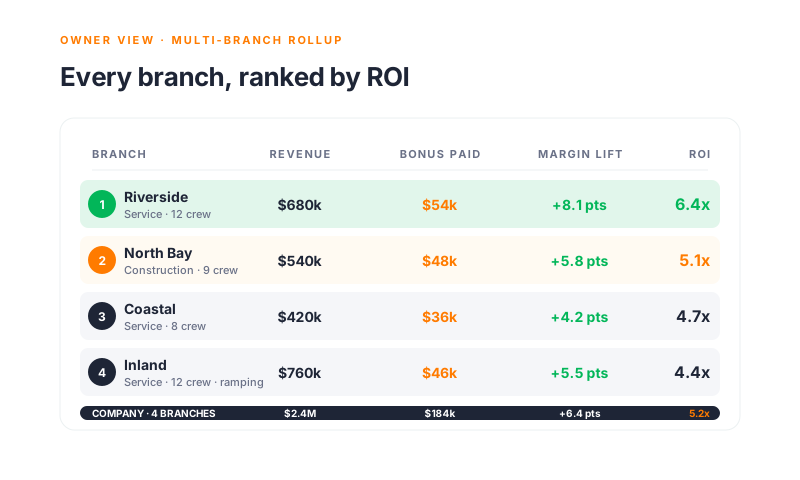
  • Multi-branch ranked rollup — quarter, year, custom range
  • Per-branch ROI computed on actual paid bonus
  • Drilldown into any branch's manager view in one click
  • Export-ready for board decks and quarterly reviews
Owner multi-branch rollup ranked by ROI
Capability 4 — Where you actually work

Alerts, digests, and payroll-ready exports

You don't open the dashboard every day. So we push to where you live — Monday Slack digests, anomaly alerts, Friday payroll exports.

Data lands in the workflow you already run. No BI portal. No dashboard fatigue.
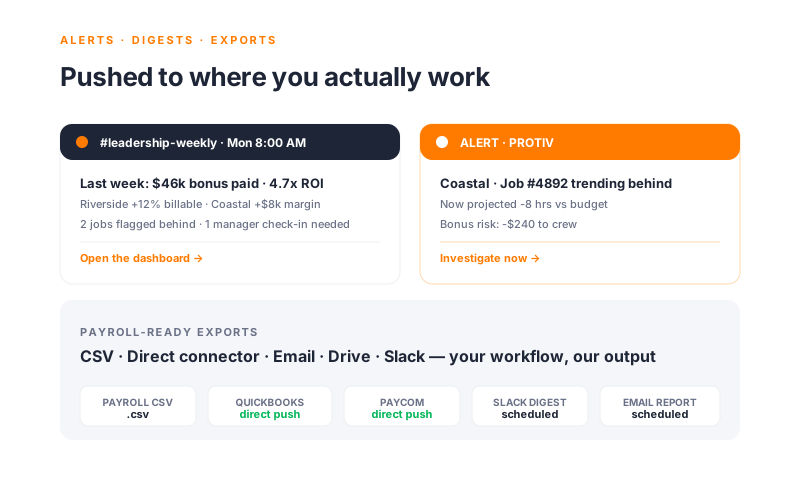
  • Slack and email digests — scheduled, role-targeted
  • Real-time anomaly alerts — flagged before payroll runs
  • Payroll exports — CSV, direct push to QuickBooks, Paycom, more
  • Custom report builder — define once, scheduled forever
Alerts, digests, and payroll exports across Slack, email, and direct connectors

Common questions

"Won't a public leaderboard break morale?"

The honest answers from operators running these programs every week.

Is the leaderboard public to the whole crew?
Configurable per branch. Some shops run it fully public. Others show rank only — no dollars. Others restrict to direct teammates. You set the rule.
What about workers at the bottom?
Bottom-rank workers see their gap-to-next, not a ranking they can never climb out of. The data is designed for upward motion, not public shaming.
How often does the data refresh?
Production data flows continuously. The leaderboard refreshes within minutes of a job being updated in the field. The manager dashboard refreshes hourly.
Can I customize the dashboard for my branch?
Yes. Default views ship out of the box. Branch managers and owners can pin custom KPIs, save filtered views, and schedule role-specific digests.
What gets exported to payroll?
Bonus by employee, period, and program — plus the underlying time and production data for audit. Direct push to QuickBooks and Paycom. CSV for everything else.
Will this overwhelm my managers with notifications?
No. Anomaly alerts only fire when a job is trending materially off-plan. The weekly digest is one Slack message. The whole point is fewer surprises, not more pings.

15 minutes a week. The dashboard does the rest.

The crew opens the app. Managers glance at the trend. Owners read the rollup. Nobody is building reports by hand. The data is already where it needs to be.

See your dashboard →

What this means for your business

A scoreboard the whole company can read.

5.2x
Average platform-wide ROI
Margin captured per dollar of bonus paid out, computed on actual data — not modeled potential
+18%
Worker engagement lift
Apps with live leaderboards see 18% more end-of-day production updates than pay programs without one
0 hrs
Spent building reports
No BI tool to license. No analyst to staff. The dashboards are built — we just turn them on for you.

"We replaced a homegrown spreadsheet a payroll admin spent half her week on. The dashboard is more accurate and runs itself."

— Operations Director · Multi-branch Service Business

The numbers are already there. Let us show them to you.

30 minutes with our team. We'll connect to a sample of your data and show what the crew, manager, and owner views look like for your real branches and crews.